Users
Create access for your employees with different levels of rights, from read only to the option of managing all settings.
- The account status information shows "Activated by email" when the user has completed the activation of their account and chosen their password.
- Each new user has 7 days to activate their account and choose their password via the activation email account received.
- When you create a new user, you can choose the default display and usage language.
- Generate the sending of a new account activation email by going to the user modification page, checking "Send an account creation email" and then clicking "Save".
Profiles
Choose whether the user will be able to access vehicle and driver information for the entire company, by clicking on Company, or for a particular site, by clicking on Site.
Choose their levels of access from the drop-down list next to "Company" or for each site next to the name of these.
The levels of access are:
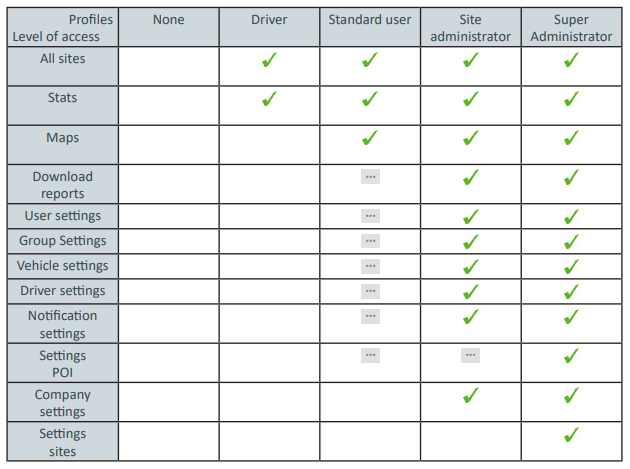
Eco-driving is available by default to Super Administrators and optional for Site Administrators (if subscribed to eco-driving)